
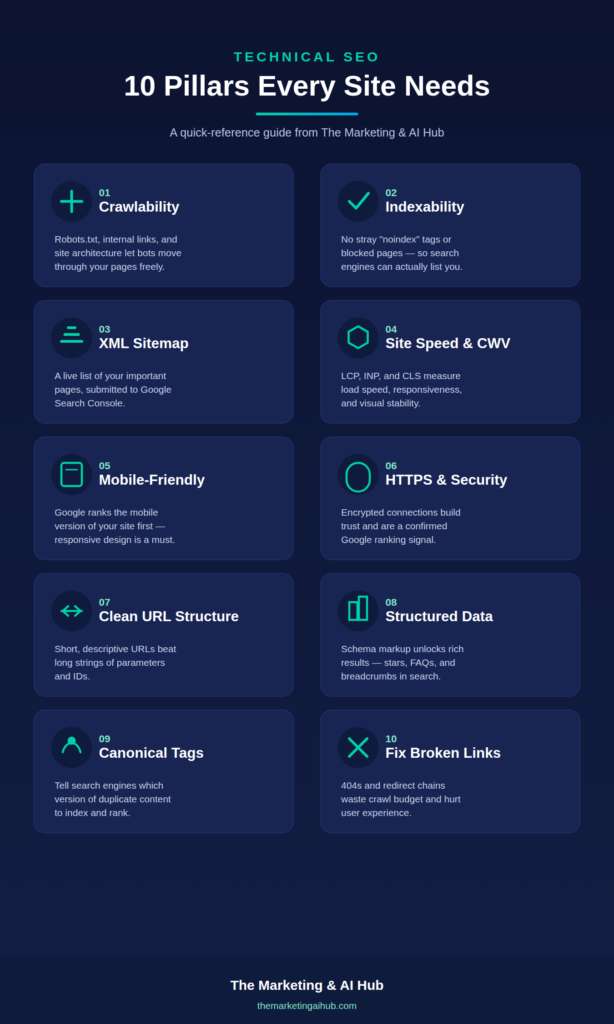
If your website looks great and has solid content but still isn’t ranking, the problem might not be your content at all — it could be technical SEO. Technical SEO is the foundation that lets Google (and every other search engine) actually find, understand, and rank your pages. Get it wrong, and even the best content on the internet can stay invisible.
In this guide, we’ll break down what technical SEO is, why it matters, and the core elements you need to get right — no jargon, just practical explanations.
What Is Technical SEO?
Technical SEO is the process of optimizing your website’s infrastructure so search engines can crawl, index, and render your pages efficiently. Unlike on-page SEO (content, keywords) or off-page SEO (backlinks, authority), technical SEO focuses on the “behind the scenes” mechanics of your site: how fast it loads, how it’s structured, how secure it is, and how easily search engine bots can move through it.
Think of it this way: if your website were a store, technical SEO is the building itself — the doors, the lighting, the layout. On-page SEO is the products on the shelves. You can have the best products in the world, but if customers can’t find the door or the lights are off, it doesn’t matter.
Why Technical SEO Matters
Search engines like Google use automated bots (crawlers) to scan the web and add pages to their index. If your site has technical issues, one of a few things can happen:
- Pages don’t get crawled at all
- Pages get crawled but not indexed
- Pages get indexed but rank poorly due to poor user experience signals
- Duplicate or conflicting content confuses search engines about which version to rank
Fixing technical SEO issues often produces some of the fastest ranking improvements available, because you’re removing barriers that were holding already-good content back.
Core Elements of Technical SEO
1. Crawlability
Crawlability is whether search engine bots can access and navigate your site. This depends on:
- Robots.txt file — tells bots which pages they’re allowed or not allowed to crawl
- Internal linking — helps bots (and users) discover pages by following links
- Site architecture — a logical, shallow structure makes it easier for bots to reach every page
2. Indexability
Even if a page is crawled, it needs to be indexable to show up in search results. Common indexability blockers include:
- Accidental “noindex” tags left on important pages
- Pages blocked by robots.txt
- Duplicate content without proper canonical tags
3. XML Sitemaps
An XML sitemap is a file that lists all the important pages on your site, helping search engines discover and prioritize them. Tools like RankMath and Yoast generate this automatically for WordPress sites, but it’s worth checking that it’s submitted in Google Search Console and kept up to date.
4. Site Speed and Core Web Vitals
Page speed is both a ranking factor and a user experience factor — slow sites lose visitors before they even see your content. Google measures this through Core Web Vitals:
- LCP (Largest Contentful Paint) — how fast the main content loads
- INP (Interaction to Next Paint) — how responsive the page feels to interactions
- CLS (Cumulative Layout Shift) — how much the layout shifts while loading
Compressing images, using caching, and choosing good hosting all help here.
5. Mobile-Friendliness
Google uses mobile-first indexing, meaning it primarily evaluates the mobile version of your site for ranking. A responsive, fast-loading mobile experience isn’t optional anymore — it’s the baseline.
6. HTTPS and Site Security
HTTPS encrypts data between your site and visitors. It’s been a confirmed ranking signal for years, and browsers now flag non-HTTPS sites as “not secure,” which can hurt trust and conversions.
7. URL Structure
Clean, descriptive URLs help both users and search engines understand what a page is about. Compare:
- Good:
themarketingaihub.com/what-is-technical-seo - Bad:
themarketingaihub.com/?p=1284&cat=3
8. Structured Data (Schema Markup)
Structured data is code added to your pages that helps search engines understand context — things like articles, FAQs, reviews, or products. It can unlock rich results in search (star ratings, FAQ dropdowns, breadcrumbs), improving click-through rates.
9. Canonical Tags
When similar or duplicate content exists on multiple URLs, a canonical tag tells search engines which version is the “master” copy to index and rank, preventing your own pages from competing against each other.
10. Broken Links and Redirects
Broken links (404 errors) waste crawl budget and hurt user experience. Redirect chains (a page that redirects to another redirect) slow down crawling and dilute link equity. Regular audits catch these before they pile up.
Technical SEO vs. On-Page SEO vs. Off-Page SEO
| Type | Focus | Examples |
|---|---|---|
| Technical SEO | Site infrastructure | Speed, crawlability, indexing, security |
| On-Page SEO | Content and relevance | Keywords, headings, meta tags, content quality |
| Off-Page SEO | External authority | Backlinks, brand mentions, social signals |
All three work together — technical SEO simply makes sure the other two efforts aren’t wasted.
A Simple Technical SEO Checklist
- Site loads in under 3 seconds on mobile
- HTTPS is enabled sitewide
- XML sitemap is submitted in Google Search Console
- Robots.txt isn’t accidentally blocking important pages
- No orphaned pages (every page has at least one internal link)
- Canonical tags are set correctly
- Core Web Vitals pass in PageSpeed Insights
- Mobile experience is fully responsive
- 404 errors and broken links are fixed or redirected
- Structured data is implemented where relevant
Final Thoughts
Technical SEO isn’t the most exciting part of digital marketing, but it’s often the highest-leverage one — a few fixes can unlock rankings that content and backlinks alone never could. If you’re running Google Ads alongside organic efforts, a technically sound site also means your landing pages load faster and convert better, which improves Quality Score too.
Want a full Technical SEO audit of your existing website? Visit themarketingaihub.com/contact